

Pinterest Keywords: What They Are, Why They Matter, and How To Do Research
If you've been diving into the world of Pinterest, trying to learn everything you need to know to start pinning for your business, you've probably heard keywords being talked about a lot. And there's a good reason for that! Keywords are the backbone of your entire Pinterest strategy.
Unlike Instagram or TikTok, Pinterest is first and foremost a search engine. That means people aren't just passively scrolling and stumbling across your content by chance. They're actively searching for specific things, and Pinterest is working behind the scenes to match their searches with the most relevant content.
If your pins aren't optimized with the right keywords, Pinterest simply won't know who to show your content to, and all of your hard work creating beautiful pins goes to waste.
So whether you're a blogger, product-based business, or service provider, understanding keywords is non-negotiable if you want Pinterest to actually drive traffic to your website.
But you may not know how to figure out what keywords are even related to your business or where to start looking for them.
This blog post is meant to be a quick, practical guide to keywords so that you can make sure your Pinterest content is searchable. Searchable content is one of the most important things to consider when starting to create content for Pinterest to get the best results. Let's dive in!
What Are Pinterest Keywords?
Keywords are a way to organize your content and help Pinterest best understand how to categorize your content. They are the words that users are commonly using to search for the type of content you are creating. You need to use them to make sure your content is searchable on Pinterest. A good way to think about keywords when getting started is to think about the topics your content is about.
Pinterest can be the biggest traffic driver to your website, but if you aren’t seeing growth, you probably aren’t using the right keywords.
I know you’re probably thinking, “Okay, but how do I find these keywords?”
I’m going to share the Pinterest tools you’ll want to use when you’re first getting started.
Where to Start With Your Pinterest Keyword Research
#1 The Pinterest Search Bar
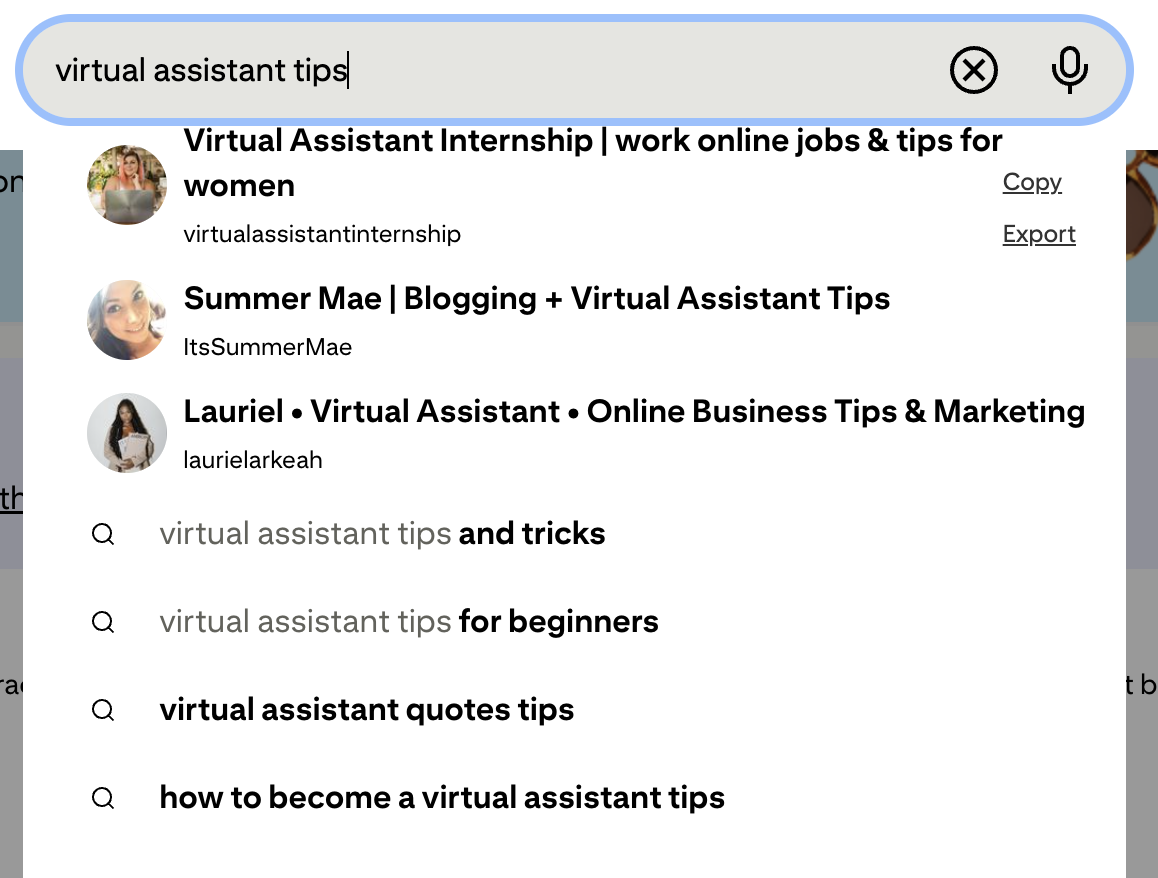
The search bar is where you go to search for pins on Pinterest. You can start by searching for topics related to your content in the search bar to make sure the content that comes up aligns with your content. If the content that comes up feels aligned, type the main keyword into the search bar again and see what suggested searches appear.
You can add these to your keyword bank so you can use them in sentence form in your pin descriptions or to be more specific in your pin titles.
Example: Let's say you're a course educator who teaches people how to become a virtual assistant. I typed the main keyword "virtual assistant tips" into the search bar, and the suggested searches gave me plenty of commonly searched phrases that I can add to my keyword bank, like "virtual assistant tips for beginners," "how to become a virtual assistant," "virtual assistant tips," "virtual assistant business," and "work from home virtual assistant."
Note: Notice how when I search for “virtual assistant tips,” profiles with those keywords show up too. Think about what keywords you should add to your name and about section so that you show up when someone searches.
#2 The Pinterest Trends Tool
This is actually a free tool available on Pinterest if you have a business account and it’s a great way to see if your keywords are currently trending or being searched for.
The trends tool is also great for finding suggestions for other relevant keywords or key phrases. Go to trends.pinterest.com to access this tool.
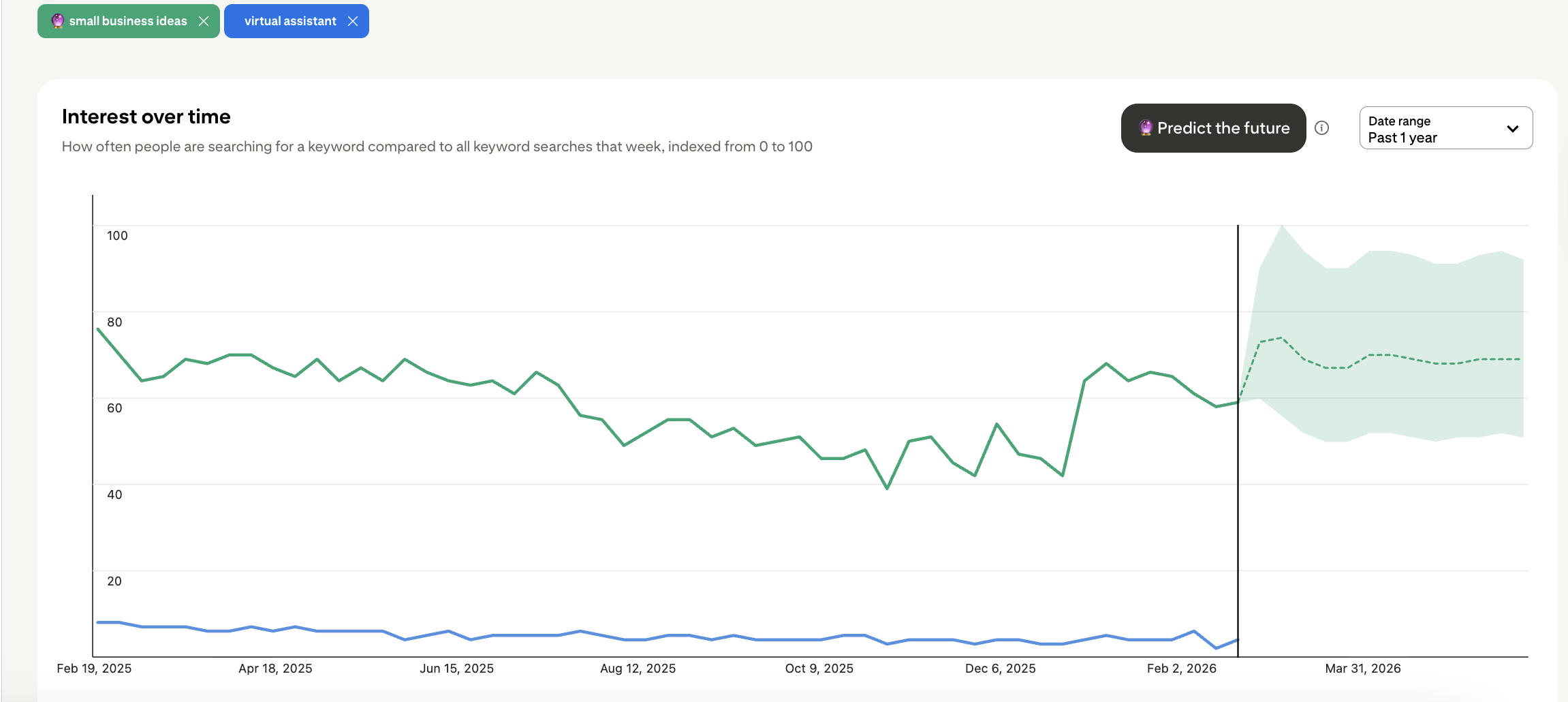
Example: I searched "virtual assistant" in the Trends tool and could see that searches for this keyword weren’t that high, which makes sense, since people don’t know to search for virtual assistant if they are trying to start a business or learn ways to make extra income. The tool did offer suggestions for other related search terms. One was “small business ideas.” That one showed much higher search results, and those searches jumped up in January. They also predict that this search term will continue to increase over the next couple of months. This tells me that “small business ideas” should be a main keyword used when creating pins for a virtual assistant course.
I use both these Pinterest tools, as a Pinterest manager, when researching keywords for myself and my clients. And now you're ready to try these methods to research your own keywords!
The truth is, Pinterest keyword research isn't just a one-time task you check off when you first set up your account. It's an ongoing part of a successful Pinterest strategy.
As trends shift and your content evolves, revisiting your keywords regularly will help you stay relevant and keep your content showing up in front of the right people.
The good news is that with the free methods above, you have everything you need to build a strong keyword foundation without spending anything.
Remember, Pinterest rewards consistency and relevance. When you pair consistent pinning with well-researched keywords woven naturally into your titles, descriptions, and board names, you give Pinterest exactly what it needs to understand your content and serve it to people who are already searching for what you offer. That's when you really start to see Pinterest work its magic as a traffic driver.
So don't skip this step. Take some time this week to research your keywords using the search bar, the Trends tool, and the Ads manager, and start building out your keyword bank.
And to make that process even easier, you can grab my free keyword bank template to organize all of your keywords in one place for easy reference when writing your pin titles and descriptions.
Looking for more support with Pinterest Marketing in 2026?
So, there ya have it! I hope this quick and easy tutorial on how to get started with your keyword research was helpful. It can be overwhelming to learn the ins and outs of a new platform. While there’s definitely more that goes into keyword research, a big part of building your Pinterest strategy is just getting started by experimenting and analying the results. But let’s be real – you probably have a lot of different things you want to implement this year, so if Pinterest is on your mind, but you simply don’t have the time to do it yourself, I’m here to help! Check out the ways we can work together on my services page.