

Social Media Strategist System Refresh Case Study: Katie Creative Company
If you’re new around here, I’m Sarah Latorre – former teacher turned virtual assistant turned online business manager (OBM) + systems strategist. I love helping female business owners with all things behind the scenes in business - from building systems with Honeybook, Dubsado, or ClickUp to creating content workflows and helping execute and get content out into the world.
I also love helping with the operations of the client experience. We strategize together to elevate your client’s experience, ensuring they have the best experience with your brand.
This client case study is the perfect example of how to blend the kinds of support I provide. It shows how amazing it can be for the backend experience to have a systems strategist help you streamline your workflows + processes and then have an OBM help manage the day-to-day of running those workflows.
About Katie Creative Company

Katie is the CEO and founder of Katie Creative Company, referred to by many online as “Katie Creative” and a “social media therapist.” She is a social media strategist who helps business owners build community-focused social media strategies. She believes nurturing your community and approaching social media by building connections with your community is the most impactful way to use the platform.
Fun fact: Katie was my very first client almost 3 years ago. I started as a VA helping her schedule her client’s content when she was a social media manager and now I am her right-hand gal, OBM, systems strategist, and project manager on retainer. As she has grown and scaled over the years, she’s had me as her strategic partner growing alongside her.
Before The System Refresh
Katie’s experience is the classic “building the train while it’s moving,” which is how business growth often happens. Oftentimes, you have to be willing to take action, create, and act with new offers. That’s how a lot of the greatest offers are born.
But it can lead to some chaos behind the scenes. Usually the systems and tech needed to sell + market your offers gets built first. Then what a lot of people will do is offer a beta round to test the offer and build the onboarding + project management process in real time.
I do not think there is anything wrong with this method. I think beta rounds of offers are such a good way to “build the train while it’s moving” because your clients know they are signing up for helping you build the experience at a discounted rate. You still get to make money while actually figuring out what is most helpful to the client in the process.
The mistake I see some people make, however, is never solidifying their processes after that beta round, so they get stuck operating without a fully built train. They duct tape processes together to keep moving and it ends up increasing their stress as they grow and take on more clients.
This is where it was helpful for Katie that she had a strategic partner who is systems + operations focused helping her behind the scenes. After the beta round, she knew she needed help getting the process flushed out so that it could be repeatable and scalable.
Manually drafting and sending emails, having to create a new proposal every time, and following a slightly different timeline with each client would slow her down and keep her from being able to take on more clients.
She knew she needed a clearly mapped-out process to continue scaling this offer.
The System Refresh
We started by gathering information. Katie brain dumped her process on a call with me and we talked about what felt good about the process and what she wanted to change. Then, I went through the Honeybook project’s of the beta clients and dumped all the email communication into a Google Doc. I also documented each step she took in the process of booking the client.
Next, I built a repeatable process starting by templatizing EVERYTHING. Every email became a template. Proposals, contracts, and questionnaires were all cleaned up and filled in with smart fields so that they did not need to be customized each time they were sent.
We didn’t just create workflows for the booking process, we also mapped out every step she took during the project. We noted each email, deliverable, and action step that was needed from the kick off call to off-boarding the client at the end of the project.
Once this process was cleaned up, streamlined, and ready to be repeatable following a clear timeline, I created a client folder template in ClickUp. Every task had clear directions and a due date.
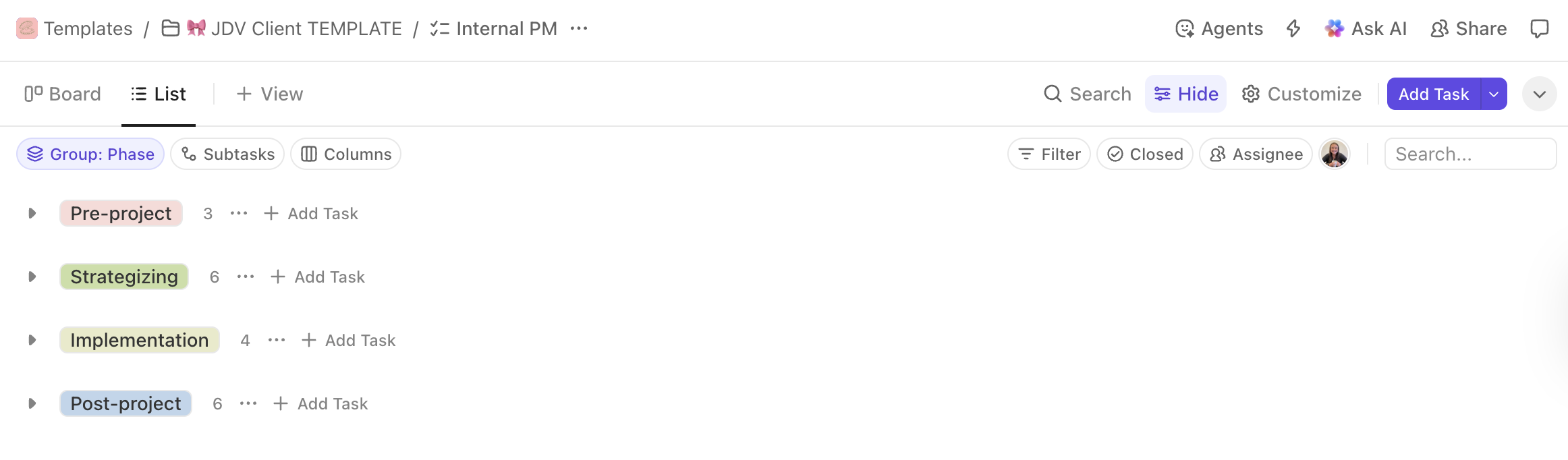
Now anytime Katie books a new project, she creates a client folder from the template and has everything she needs to complete the project. There is no guessing or spending an hour mapping out the project. She is ready to dive right into the creative process knowing her ClickUp task list is keeping her on track.
After The System Refresh
With a clear process in place and every step mapped out, it was easier for Katie and I to see what parts of the process she should continue and where I could step in and manage. She could see what parts needed her brain, her personal connection, and where she could delegate.
Now she handles the initial inquiry + discovery call, the creative part of the project and meeting with the client. And I basically handle the rest. Making sure invoices are paid, contracts are sent and signed, calls are booked, questionnaires are complete, clients get all they need at the end of the project – that’s all me (and automations).
When a client reaches out to book, there’s no more scrambling. Katie knows exactly where she needs to show up and what is being taken care of for her. This frees up time for her to run a group program, work with more clients, move, and plan a wedding.
It’s not just the delegating that has helped, but it’s knowing that there is a clear process that doesn’t leave her stressed or guessing about how a project is going to get done.
Tips You Can Apply To Your Business
Stop and reflect after launching a new offer - Set aside time in your launch planning to reflect on your systems and make some tweaks to streamline your process after you’ve nailed it down.
Map out the steps in one of your project-based offers - Choose one past project to review and document each email, file, deliverable, task in the project. Then use that as a framework to create a process you can follow again and again.
Create email templates - if you feel overwhelmed by systems, this is where I recommend you start. Next time you send an email you know you send during every project, add it as a template in your CRM platform (or in a doc if you don’t use a CRM). This is one of the easiest, low-lift ways to save you time.
What Katie Says
“Sarah has such a talent for seeing processes in a way I could only wish to see them!
She is able to see the specific spots you can streamline and make things easier and executes on creating those shortcuts for you! This has resulted in a better experience working inside of my business for me and a cleaner, more streamlined experience for my clients on the other end!!
It feels so much easier not to drop the ball with everything Sarah created in place!”
Learn more about Katie Creative Company’s social media strategy service, join the waitlist for her social media course, The Sweet Spot, or connect with her over on Instagram.
Think you need some help mapping out your process and getting your system streamlined and feeling aligned? Reach out to schedule a clarity call.